
DNS is the foundational routing layer of the internet. Yet in multi-cloud environments, deprovisioning a cloud resource without removing its corresponding DNS record creates a security vacuum: a dangling domain ready to be hijacked.
What is Domain Dangling?
In modern enterprise architectures, websites and services are spread across multiple public clouds (AWS, Azure, GCP) and SaaS providers. To route traffic, organizations create DNS aliases—typically CNAME (Canonical Name) or MX records—pointing to cloud-native hostnames (e.g., myapp.azurewebsites.net or mybucket.s3.amazonaws.com).
A dangling DNS record (also known as dangling domain) occurs when a DNS record points to a deprovisioned cloud resource that has been deleted, but the DNS entry remains active. Since cloud resource namespaces are often globally shared and dynamically assigned, an attacker can register a new cloud resource with the exact namespace of the deleted target. Consequently, the organization's legitimate domain resolves directly to the attacker’s malicious cloud instance, executing a subdomain takeover.
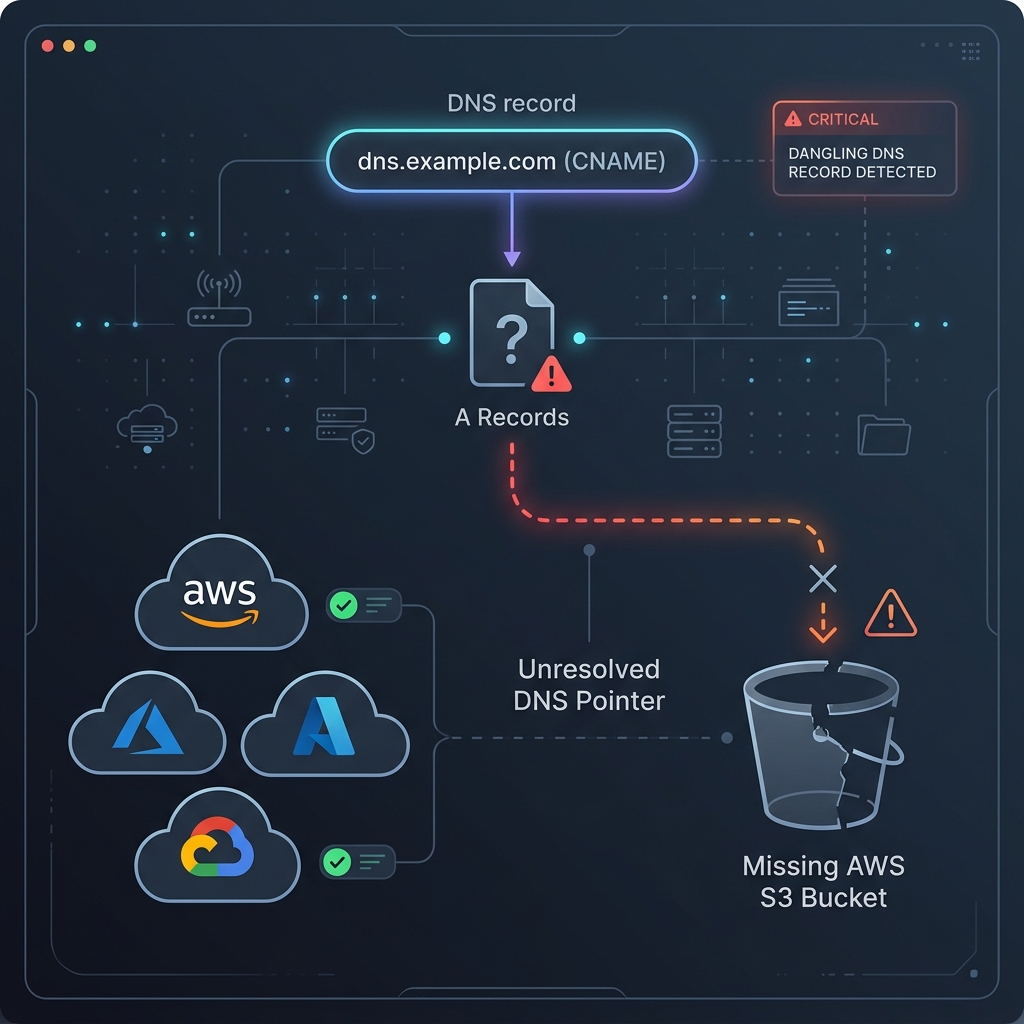
Vulnerability Mechanics Across Multi-Cloud Ecosystems
Each cloud provider offers unique services that are susceptible to domain dangling when not managed properly. Below are the most common vectors across Azure, AWS, and GCP:
1. Microsoft Azure (App Services & Traffic Manager)
If you map portal.ApexDigits.com as a custom domain to an Azure App Service hosted at apexdigits-portal.azurewebsites.net, and then delete that App Service without removing the CNAME record in your DNS server, a vulnerability is created. Azure releases the apexdigits-portal.azurewebsites.net hostname back into the pool. An attacker can spin up a new Azure App Service in their own subscription, claim the name apexdigits-portal, and instantly control all incoming traffic to portal.ApexDigits.com.
2. Amazon Web Services (S3 Static Hosting & Elastic Beanstalk)
AWS S3 buckets used for static website hosting must have the exact same name as the domain routing to them (e.g. bucket name: docs.ApexDigits.com). If the bucket is deleted, the DNS CNAME still points to the AWS S3 endpoint. Because bucket names are globally unique, an attacker can create a bucket in the same region named docs.ApexDigits.com, upload a malicious payload, and immediately hijack the custom domain.
3. Google Cloud Platform (Cloud Run & App Engine)
While GCP enforces domain verification ownership checks during custom domain mappings on Cloud Run and App Engine, dangling issues can still occur when DNS configurations point to legacy, unmapped Cloud CDN backends, or if verification tokens are left in public DNS TXT records, allowing attackers to verify domain ownership bypasses on tenant accounts.
Auditing & Detection: Automated PowerShell Scanner
To identify vulnerability windows, security teams must proactively audit DNS zones and verify if the referenced cloud backends exist. Below is a production-ready PowerShell script designed to scan external CNAME targets and flag potential dangling DNS vulnerabilities:
# Multi-Cloud Dangling DNS Audit Tool
# Queries a list of CNAMEs and evaluates host response signatures

$DomainsToTest = @(
    "portal.ApexDigits.com",
    "docs.ApexDigits.com",
    "api.ApexDigits.com"
)

function Test-DanglingDns {
    param (
        [string]$Domain
    )

    Write-Host "Auditing: $Domain" -ForegroundColor Cyan
    try {
        # Resolve CNAME target
        $DnsResult = Resolve-DnsName -Name $Domain -Type CNAME -ErrorAction Stop
        $Target = $DnsResult.NameHost
        Write-Host "  -> CNAME Target: $Target" -ForegroundColor Gray

        # Test HTTP response to detect deprovisioned signatures
        $Response = Invoke-WebRequest -Uri "http://$Domain" -Method Head -TimeoutSec 5 -ErrorAction SilentlyContinue -UserAgent "DnsAuditor/1.0"
        $StatusCode = $Response.StatusCode
        $Headers = $Response.Headers
    }
    catch {
        $ErrorMessage = $_.Exception.Message
        Write-Host "  -> Error contacting host: $ErrorMessage" -ForegroundColor Yellow
    }

    # Evaluation Rules based on Provider Signatures
    if ($Target -like "*.azurewebsites.net") {
        # Azure App Service returns 404 with a specific web-app-not-found header or content
        $Content = Invoke-RestMethod -Uri "http://$Domain" -Method Get -TimeoutSec 5 -ErrorAction SilentlyContinue
        if ($Content -like "*Web Site not found*" -or $Content -like "*404 - Web Site not found*") {
            Write-Host "  [!] VULNERABLE: Azure App Service has been deprovisioned!" -ForegroundColor Red
            return
        }
    }
    elseif ($Target -like "*.s3-website-*.amazonaws.com" -or $Target -like "*.s3.amazonaws.com") {
        # AWS S3 returns NoSuchBucket code inside 404 responses
        try {
            $Request = Invoke-WebRequest -Uri "http://$Domain" -TimeoutSec 5
        }
        catch {
            if ($_.Exception.Response.StatusCode.value__ -eq 404) {
                $Stream = [System.IO.StreamReader]::new($_.Exception.Response.GetResponseStream())
                $Html = $Stream.ReadToEnd()
                if ($Html -like "*NoSuchBucket*") {
                    Write-Host "  [!] VULNERABLE: AWS S3 Bucket does not exist!" -ForegroundColor Red
                    return
                }
            }
        }
    }
    elseif ($Target -like "*.github.io") {
        # GitHub Pages returns a custom 404 page when a repository custom domain is unmapped
        try {
            $Request = Invoke-WebRequest -Uri "http://$Domain" -TimeoutSec 5
        }
        catch {
            $Stream = [System.IO.StreamReader]::new($_.Exception.Response.GetResponseStream())
            $Html = $Stream.ReadToEnd()
            if ($Html -like "*There isn't a GitHub Pages site here*") {
                Write-Host "  [!] VULNERABLE: GitHub Pages custom domain is unmapped!" -ForegroundColor Red
                return
            }
        }
    }

    Write-Host "  [+] SAFE: Endpoint appears active or non-vulnerable." -ForegroundColor Green
}

foreach ($Domain in $DomainsToTest) {
    Test-DanglingDns -Domain $Domain
    Write-Host "-------------------------------------------"
}
Remediation and Prevention Strategies
Securing multi-cloud environments from domain dangling requires shifting from reactive detection to proactive hygiene and architectural controls.
Infrastructure as Code (IaC)
Manage both the cloud resource and the DNS record in the same Terraform or Bicep module. When you run terraform destroy, the DNS record is automatically removed alongside the resource.
Use Alias Records
Instead of creating standard CNAME records, leverage cloud-native Alias records (e.g., Azure DNS Alias or AWS Route 53 Alias). These records dynamically track the lifecycle of the cloud resource and resolve to nothing if the resource is deleted.
Mandatory Custom Domain Verification
Enforce domain verification policies. Azure now uses verification IDs (TXT records) before allowing a custom domain to bind to an App Service, preventing unauthorized takeover attempts.
Conclusion
Subdomain takeovers through dangling DNS records represent a severe breach vector, potentially allowing attackers to steal session cookies, bypass Content Security Policies (CSP), and host phishing portals under your trusted brand name. By combining IaC lifecycle management, adopting cloud-native Alias records, and running continuous DNS auditing tools, enterprises can systematically eliminate the threat of domain dangling.
20+ years of enterprise technology leadership across cloud, infrastructure, and digital workplace. Passionate about sharing practitioner knowledge and advancing the profession.